Small, affordable and easy to use, the IR Obstacle Avoidance Sensor Module is one of the most common sensors found in beginner robotics and electronics projects. It can detect nearby objects without touching them, making it useful for everything from obstacle-avoiding robots to simple automation systems.
The module uses infrared light to sense whether an object is present in front of it. When an object reflects the emitted IR light back toward the receiver, the sensor processes that signal and provides a digital output to a microcontroller such as Arduino, ESP32 or another development board.
For students, hobbyists and makers, this sensor is a simple way to add basic obstacle detection to a project without building a complicated sensing circuit from scratch.
What Is an IR Obstacle Avoidance Sensor Module?
An IR Obstacle Avoidance Sensor Module is a proximity detection device that uses infrared light to identify objects within a relatively short range.
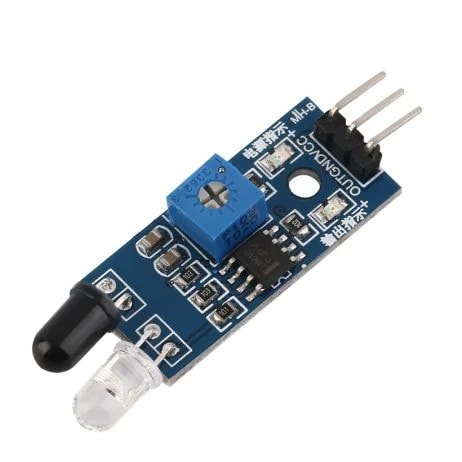
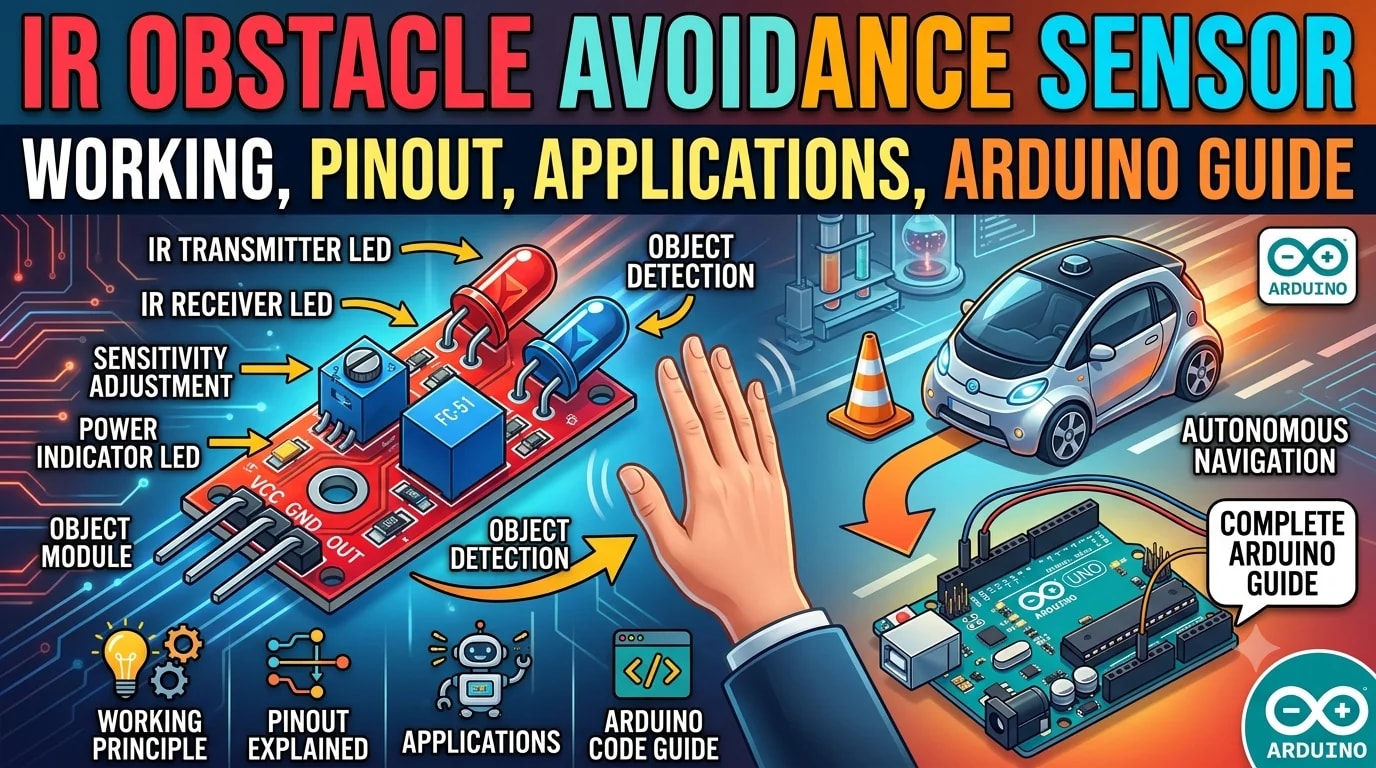
Most commonly available modules have an IR transmitter, an IR receiver, a comparator circuit such as the LM393, an adjustable potentiometer and indicator LEDs. The transmitter sends infrared light toward the area in front of the sensor. When that light hits an object, some of it reflects toward the receiver.
The sensor then compares the received signal with a preset threshold. Depending on the module design, its output changes state when an obstacle is detected. Many popular modules provide an active-low digital output, meaning the OUT pin goes LOW when an obstacle is detected.
How Does an IR Obstacle Sensor Work?
The working principle is fairly simple.
The IR LED continuously emits infrared light. Since infrared light is outside the visible spectrum, you normally cannot see it with your eyes.
When an object comes into the sensor's detection area, the infrared light bounces off its surface and reaches the receiver. The receiver detects this reflected IR energy.
An onboard comparator circuit processes the signal and compares it with a threshold adjusted using the small potentiometer on the module.
When the reflected signal crosses that threshold, the sensor changes its output state.
In a typical active-low module:
No obstacle → OUT HIGH
Obstacle detected → OUT LOW
This digital signal can then be read by a microcontroller and used to control motors, LEDs, alarms, relays or other components.
Main Components of an IR Obstacle Avoidance Module
Although the board is small, several components work together to make detection possible.
IR Transmitter
The infrared LED sends IR light toward the target area.
IR Receiver
The receiver detects infrared light reflected from nearby objects.
LM393 Comparator
Many commonly sold modules use an LM393 comparator to compare the detected signal against an adjustable reference threshold and produce a clean digital output.
Potentiometer
The onboard potentiometer allows the detection threshold or effective sensing distance to be adjusted.
Indicator LEDs
Most boards include LEDs that make it easier to check whether the module is powered and whether an object is being detected.
IR Obstacle Avoidance Sensor Module Pinout
The most common version uses three pins:
Pin | Function | Description |
|---|---|---|
VCC | Power | Connect to a suitable 3.3V or 5V supply |
GND | Ground | Connect to the circuit ground |
OUT | Digital Output | Sends the obstacle detection signal |
A large number of modules are designed for operation from 3.3V to 5V, although exact specifications can vary between boards. Always check the documentation for the specific module you are using.
IR Sensor Detection Range
One of the first questions people have is: How far can an IR obstacle sensor detect an object?
Many popular modules are advertised with an adjustable detection range of approximately 2 cm to 30 cm. However, the actual usable distance can vary considerably depending on the module, target material, surface angle and surrounding lighting conditions. Some versions are designed for a shorter range.
This is why the potentiometer is important.
Instead of relying on one fixed detection distance, you can adjust the module until it responds at the distance you need for your project.
What Can Affect IR Sensor Detection?
IR sensors are not measuring distance in exactly the same way as a dedicated distance sensor. They are detecting reflected infrared light, so the characteristics of the object matter.
A light-colored surface generally reflects more IR energy than a very dark surface. Object size, shape and angle can also affect the amount of reflected light reaching the receiver.
Strong ambient infrared sources, including direct sunlight, can also interfere with reflective IR detection.
For this reason, the stated detection range should be treated as a typical value rather than a guarantee for every type of object and environment.
How to Connect an IR Sensor to Arduino
One of the easiest ways to use an IR obstacle sensor is with an Arduino Uno.
A typical connection is:
IR Sensor | Arduino Uno |
|---|---|
VCC | 5V |
GND | GND |
OUT | Digital Pin 2 |
Once connected, the Arduino can continuously check the OUT pin and determine whether the sensor has detected an obstacle.
Basic Arduino Code
const int irSensor = 2;
void setup() {
pinMode(irSensor, INPUT);
Serial.begin(9600);
}
void loop() {
int sensorState = digitalRead(irSensor);
if (sensorState == LOW) {
Serial.println("Obstacle detected");
} else {
Serial.println("Path is clear");
}
delay(100);
}
The example above assumes a common active-low IR obstacle sensor, where LOW indicates obstacle detection. Output polarity can differ between modules, so it is worth testing the sensor before building the final logic into your project.
Applications of IR Obstacle Avoidance Sensors
The biggest reason these modules remain popular is their versatility.
1. Obstacle Avoiding Robots
This is probably the most popular application.
An IR sensor can be mounted on the front of a robot to detect an object in its path. When the sensor detects an obstacle, the microcontroller can tell the robot to stop, reverse or turn.
Using multiple sensors on the left, right and front can provide more information for navigation.
2. Line Following Robots
IR-based sensing is also widely used in line-following projects.
By detecting differences in surface reflectivity, sensors can help a robot distinguish between a dark line and a lighter background.
However, a dedicated line sensor arrangement may be better suited for precise line tracking than a basic obstacle module.
3. Object Detection
The module can detect whether an object is present at a specific point.
This makes it useful for simple counting systems, conveyor demonstrations and small automation projects.
4. Automatic Doors and Simple Automation
An IR sensor can be used as a basic proximity trigger. For example, detecting a nearby hand or object can activate a motor, light or other circuit.
5. Educational Electronics Projects
Because the module requires only a few connections and produces an easy-to-read digital signal, it is particularly popular in Arduino and robotics learning projects.
Advantages of an IR Obstacle Avoidance Sensor
The module offers several practical benefits.
Low cost: It is inexpensive compared with many advanced distance sensors.
Simple interface: Most versions use only VCC, GND and OUT.
Easy to program: A microcontroller can read the output using a simple digital input.
Adjustable sensitivity: The onboard potentiometer provides control over the detection threshold.
Fast response: The sensor can react quickly enough for many small robotics and automation applications.
Compact size: Its small PCB makes it easy to mount on robot chassis and prototypes.
These characteristics have made IR obstacle modules a popular entry point into robotics and embedded electronics.
Limitations of IR Obstacle Sensors
Despite their usefulness, these sensors are not suitable for every application.
The sensor depends on reflected infrared light, so object color, surface finish, shape and angle can affect detection.
Dark or poorly reflecting surfaces may be harder to detect consistently. Bright ambient light can also introduce interference in some situations.
Another important limitation is that a basic obstacle module generally tells you whether an object crosses its detection threshold, rather than providing a precise distance measurement.
For projects that need accurate distance readings, a dedicated distance sensor may be a better option.
IR Sensor vs Ultrasonic Sensor
Both technologies are popular in robotics, but they work differently.
Feature | IR Obstacle Sensor | Ultrasonic Sensor |
|---|---|---|
Detection method | Reflected infrared light | Sound waves |
Typical use | Short-range obstacle detection | Distance measurement |
Interface | Usually digital output | Usually trigger/echo or module-specific |
Cost | Very low | Low to moderate |
Sensitivity to object surface | Relatively high | Different set of limitations |
Distance measurement | Usually threshold-based | Designed for distance measurement |
Setup | Very simple | Slightly more involved |
For a robot that only needs to know “Is something in front of me?”, an IR obstacle module can be a very practical solution.
For a project that needs to know “How far away is the object?”, an ultrasonic or other dedicated distance sensor may be more appropriate.
Tips for Getting Better Results
The best performance usually comes from proper adjustment rather than simply increasing the detection range.
Start by placing an object at the distance you actually need. Then slowly adjust the potentiometer until the module switches reliably.
Test the sensor with different objects before finalizing your robot or automation system. A detection setting that works perfectly with a white cardboard box may behave differently with a dark or glossy object.
It is also a good idea to keep the sensor away from direct sunlight and strong infrared light sources whenever possible.
Frequently Asked Questions
What is an IR obstacle avoidance sensor used for?
It is mainly used to detect nearby objects without physical contact. Common applications include obstacle-avoiding robots, object detection, simple automation and educational electronics projects.
Does an IR obstacle sensor measure distance?
A basic obstacle avoidance module generally provides a threshold-based detection signal rather than an accurate distance measurement. Its effective detection range can usually be adjusted with the onboard potentiometer.
Can I use an IR obstacle sensor with Arduino?
Yes. These modules are widely used with Arduino and other microcontrollers. Typically, VCC and GND provide power while the OUT pin connects to a digital input.
Does an IR obstacle sensor work in sunlight?
Direct sunlight and other strong infrared sources can interfere with reflective IR sensors, so performance may become less reliable in bright outdoor conditions.
Why does my IR sensor detect some objects but not others?
Different surfaces reflect infrared light differently. Color, material, texture, size and angle can all influence how much IR light reaches the receiver.
Final Thoughts
The IR Obstacle Avoidance Sensor Module may be a simple piece of electronics, but it is surprisingly useful.
Its combination of low cost, compact size, adjustable sensitivity and easy digital output makes it a practical choice for beginner robotics, Arduino projects and simple automation systems.
It is especially useful when a project does not require highly accurate distance measurements and simply needs a quick answer to one question: is there an object in front of the sensor?
For students and makers building their first robot, automated system or electronics prototype, an IR obstacle sensor is often one of the easiest sensors to start with.
Related products
Components that pair well with this guide.